
How to Maintain Camera Lenses Without Overcleaning
A fingerprint on the front element can turn a sunlit street scene soft. A single grain of sand can do more damage than a week of ordinary dust. To maintain camera lenses well, the goal is not constant cleaning. It is knowing when to leave a lens alone, when to act, and how to handle the glass without turning a small mark into a permanent scratch.
For everyday photographers, lens care is less about buying complicated kits and more about protecting the parts that shape every image. Whether you shoot with a compact Kodak camera, an instant Polaroid, or an interchangeable-lens system, a few considered habits keep your gear ready for the moments worth keeping. Done simply, this practice helps extend the life of your gear and keep it in top shape.
Maintain Camera Lenses With a Light Touch
The most common lens-care mistake is overcleaning. Modern lens elements often have delicate lens coatings designed to reduce flare, manage reflections, and improve contrast. They are durable enough for normal use, but they do not benefit from aggressive rubbing every time you notice a speck of dust.
Start by looking at the lens in good light. A few tiny particles on the front glass rarely affect image quality. If the image looks clear and there are no visible smudges, leave it alone. Cleaning is for fingerprints, salt spray, obvious grime, or dust that is actually attached to the surface.
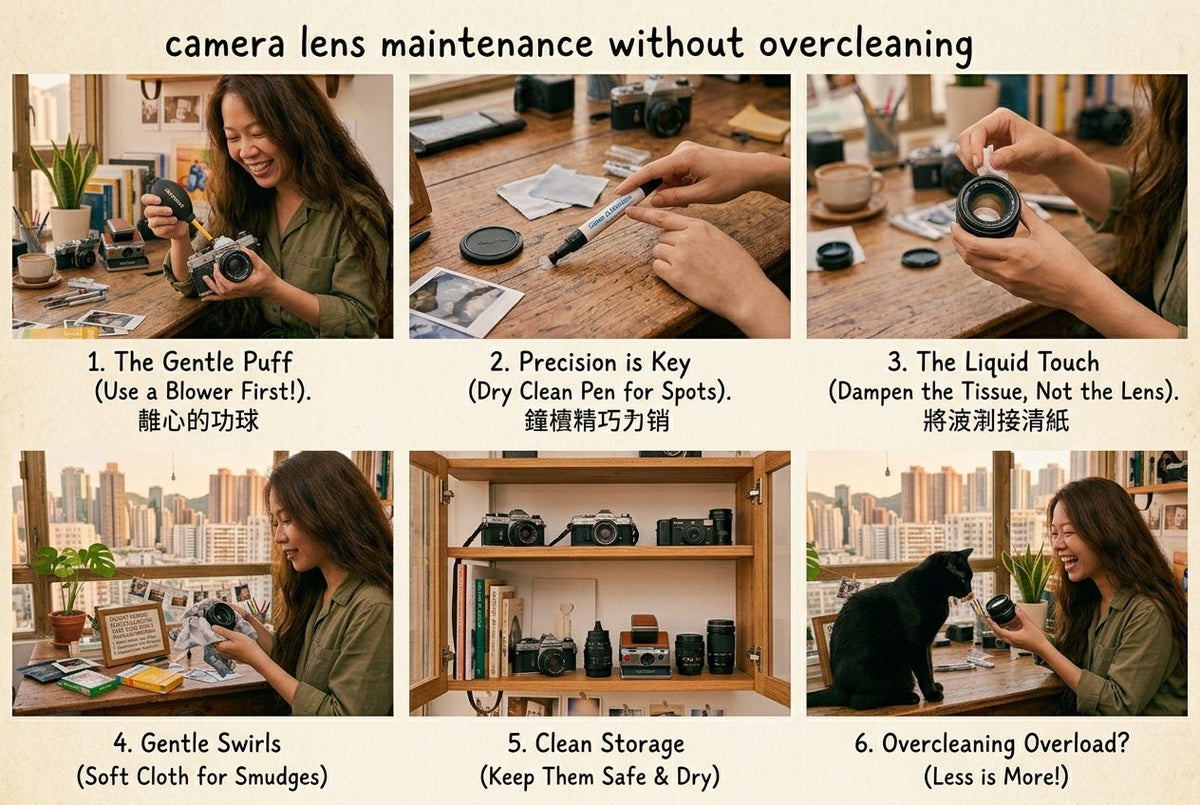
When cleaning is needed, remove loose particles before touching the glass. A manual air blower is the right first move. Hold the camera with the lens facing downward so gravity helps keep dust moving away from the surface rather than deeper into the lens barrel, then use a few short puffs. Never use your breath. Moisture from your mouth can leave residue, and a strong blast of air can move particles in the wrong direction.
Avoid household tissues, shirt hems, paper towels, and whatever happens to be in a bag pocket. Their fibers can scratch coatings or leave lint behind. A clean microfiber lens cloth is the essential tool here. Keep it in a small pouch or sealed case, because a cloth that has collected grit is no longer a cleaning cloth.
For a fingerprint or oily mark, apply a tiny amount of lens-cleaning solution to the cloth, never directly to the lens. Wipe gently from the center outward in a loose spiral. There is no prize for pressure. One or two careful passes are usually enough. Then check the glass under light for any remaining shine or residue.
Use a Lens Pen Selectively
A lens pen can be useful for light marks, especially when you are traveling with a compact camera. Use the brush end first to lift loose dust, then use the cleaning tip with a gentle circular motion. Keep the cap on when it is not in use, and replace the pen when its cleaning surface looks dirty or worn.
A pen is convenient, not magic. If a lens has been exposed to beach sand, sticky residue, or heavy rain, a microfiber cloth and proper fluid give you more control. The tool should suit the mess.
Protect the Lens With Lens Caps Before It Needs Cleaning
The cleanest lens is the one that never met the bottom of your tote bag. A camera case, padded insert, or dedicated compartment prevents hard objects such as keys, chargers, and loose accessories from pressing against the lens surface.
For interchangeable-lens cameras, use front and rear lens caps whenever a lens is off the camera, since leaving lenses uncapped lets them collect dust. Put a body cap on the camera, too. This reduces dust around the mount and keeps the sensor area protected during storage. When changing lenses outdoors, have the next lens ready before removing the current one, and avoid changing lenses in dusty or windy places when you can. Turn your body away from wind and keep the camera opening pointed downward.
Lens hoods do more than shape light. They create a small buffer against accidental bumps, lower the risk of accidental damage in crowded settings, and reduce the chance of touching the front element with a finger. They are particularly useful for street photography, travel, and crowded settings where gear gets moved quickly.
Protective filters are more personal. A high-quality uv filter can offer reassurance in wet, dusty, or high-contact environments. It also gives you a surface you can clean more freely. But a cheap or damaged filter may introduce flare, reflections, or a slight loss of contrast, especially in difficult light. If you use one, choose quality over convenience and remove it when it creates visible image issues.
Compact and instant cameras need a slightly different approach. Their lenses are often built into the body, and their covers or moving mechanisms can attract lint. Keep the camera in a case and make sure the lens area is clear before opening or extending it, since unnecessary movement can pull in more dust. Never force a stuck lens cover. If a mechanism does not move smoothly after exposure to sand or moisture, stop using it and have it checked rather than trying to pry it open.
Store Lenses to Keep Moisture, Heat, and Fungus Out of the Picture
Dust is annoying. Moisture is the bigger threat. In humid environments, trapped moisture can contribute to fungus inside a lens. It often appears as wispy threads, cloudy patches, or branching marks behind the glass. At that point, exterior cleaning will not help, and sensor cleaning is a job for professionals only when internal dust or fungus is involved.
After shooting in rain, snow, or high humidity, wipe the camera exterior and leave the bag open in a dry, dust free indoor space for a while. Do not seal damp gear immediately into a case. If you move from an air-conditioned room into hot, humid weather, let the camera acclimate inside its bag before taking it out. That slows condensation from forming on and inside the equipment.
For long-term storage, store lenses in a clean, dry cabinet away from direct sunlight, radiators, and damp basements. A few rechargeable silica gel packs in your camera storage area can help manage humidity. Check and refresh them as directed, and regularly inspect stored gear for moisture or buildup. You do not need a museum-grade dry cabinet for every camera, but regular photographers in consistently humid climates may find one worthwhile.
Heat deserves equal respect. Leaving a camera on a car dashboard can affect adhesives, lubricants, batteries, and electronic components. It may also warp a compact camera's exterior over time. Keep the camera shaded, bagged, and out of extreme temperature swings whenever possible, since repeated exposure can affect image quality over time.
Clean the Parts Around the Glass
A lens can look perfect and still work poorly if dust, oil, moisture, or debris collects around the mount, zoom ring, or lens cap. These areas deserve occasional attention, just without introducing liquid where it does not belong.
Use a soft brush or blower to blow away loose debris around the lens mount and cap threads. Wipe the exterior barrel with a clean, lightly dampened microfiber cloth if needed, then dry it promptly. Do not spray cleaning fluid into seams, buttons, zoom rings, or electronic contacts. For metal contacts on an interchangeable lens, a dry microfiber cloth is generally enough. If the camera begins showing connection errors, professional inspection is safer than experimenting with solvents.
Pay attention to the lens cap, too. A dirty cap can transfer grit straight back to the front element. A quick wipe every few weeks keeps this small detail from becoming the source of the problem. Experimenting around the mount or sensor area can ruin delicate parts and cost more money than proper service.
Build a Regular Cleaning Routine That Fits How You Shoot
Daily shooters may need light, regular cleaning as a habit: a quick visual check before heading out and a wipe-down after a wet or dusty session. A camera that comes out only for weekend trips can be inspected before packing, then stored clean and dry afterward; for example, that rhythm changes with how and where you shoot, not a fixed calendar rule.
Keep a compact care kit with a blower, one lens pen, two clean microfiber cloths, and a small bottle of lens fluid as one of the cleaning kits you can leave home with. Additionally, two cloths matter because one can remain dedicated to the glass while the other handles the camera body or accessories. Replace cloths when they become stained, stiff, or overloaded with lint.
If you see haze inside the lens, fungus, deep scratches, loose elements, persistent fogging, or a lens mechanism that catches, skip the DIY fixes. Service costs can be frustrating, but forcing a mechanism or taking apart a lens without the right tools can turn a repairable issue into a replacement. Weather sealing helps, and Sigma is one example, but it is not a substitute for careful care.
A well-maintained lens does not need to look obsessively polished. It needs to be protected, dry, and ready when the light gets interesting. Maintaining these habits is crucial to keeping gear ready for the images you want captured, and it will stay part of your everyday creative kit for years to come.