文章: Urban Commute Bag Setup Example That Works
Urban Commute Bag Setup Example That Works
The best urban commute bag setup example is not a bag packed for every possible emergency. It is a considered edit: enough for a full day of movement, focused enough to stay light, and polished enough to look right when the train doors open and your first meeting starts ten minutes later.
For city professionals and creative commuters, the bag is less about storage than rhythm. It carries the workday, protects the tools that matter, and keeps small essentials from becoming pocket clutter. The goal is simple: a setup that moves from apartment to sidewalk, train platform, desk, coffee shop, and evening plans without asking you to repack your life.
Start With a Bag That Fits Your Actual Route
A good commute setup begins with the silhouette. Before choosing what goes inside, consider how you move through the city. A walk-heavy commute, crowded subway ride, bike lane, or drive to a shared workspace each asks something different from your bag.
For most urban routines, a compact backpack is the strongest all-around choice. It distributes weight evenly, leaves both hands free, and gives a laptop the protection it needs. Look for a structured shape rather than a loose tote-like interior. A dedicated laptop sleeve, weather-resistant exterior, and clean access points are more useful than a long list of novelty compartments.
A crossbody can be the better call for a lighter kit: tablet instead of laptop, a small camera, notebook, phone, and a few personal items. It is fast to access and visually sharp, but it becomes uncomfortable when overloaded. If your bag needs to carry a 14-inch laptop, charger, lunch, gym gear, and a camera, choosing a larger crossbody for the look usually creates a worse commute.
Water resistance matters more than many commuters think. City weather is rarely dramatic until it catches you halfway between stations with electronics inside. A waterproof backpack such as a Gaston Luga design brings practical protection without the hiking-gear aesthetic. That balance is the point: technical enough for the forecast, refined enough for the office.
The Urban Commute Bag Setup Example
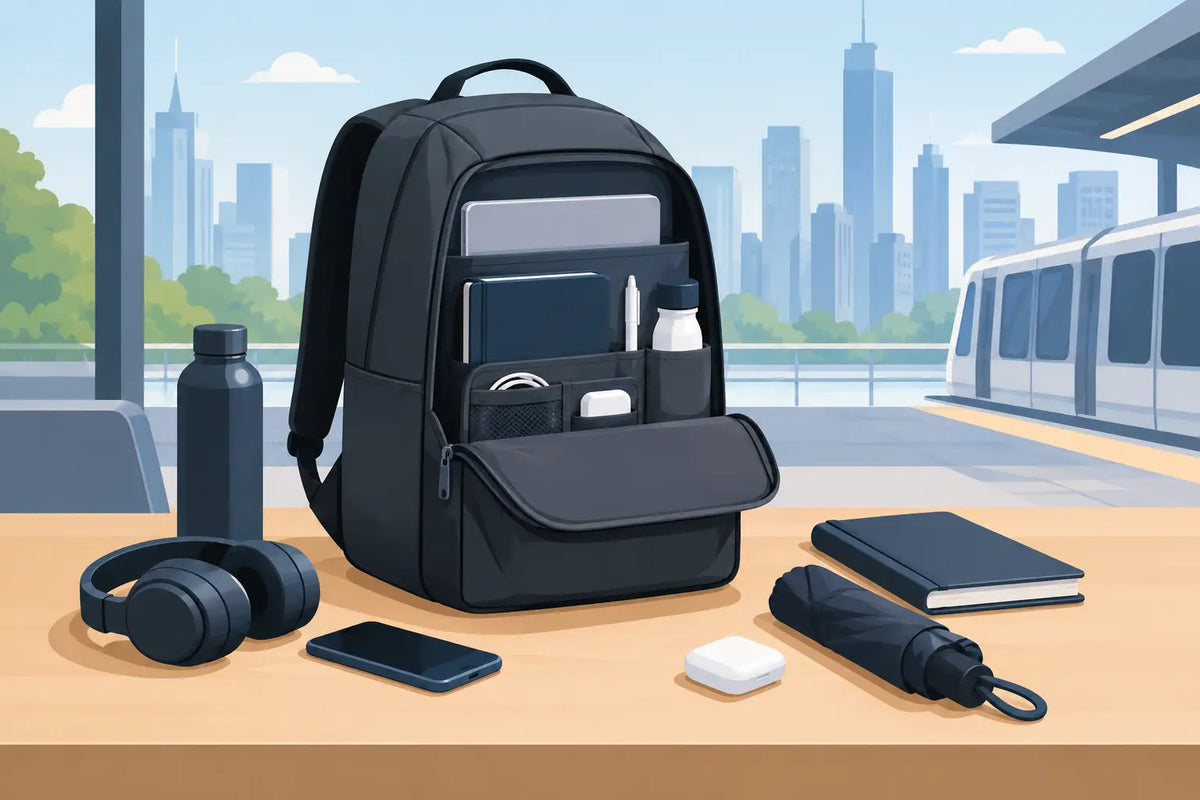
Imagine a commuter who works in a creative studio three days a week, travels by train, and often stops somewhere after work. Their setup is built around a medium-sized backpack with a padded laptop compartment and a slim front pocket.
Closest to the back panel sits a 13-inch laptop in its dedicated sleeve. Keeping the heaviest item against your body makes the bag feel noticeably more stable, especially on stairs or a moving train. A thin document folder goes beside it, holding a notebook, one pen, and any papers that cannot be replaced with a phone screen.
The main compartment holds a compact pouch with a charging cable, wall adapter, earbuds, and a small power bank. This is the piece that prevents the familiar bottom-of-the-bag search for a cable at 4:42 p.m. Put every loose tech item in one pouch. It creates a cleaner interior and makes it easy to move your work kit between bags when needed.
A reusable water bottle sits upright in a side pocket or the outer edge of the main compartment. If your bag has no secure place for one, choose a bottle with a truly reliable lid. Leaks are not a minor inconvenience when a laptop is part of the setup.
The quick-access pocket is reserved for the items you reach for in motion: transit card, keys, wallet, hand sanitizer, lip balm, and a small pack of tissues. Nothing else belongs there. A front pocket full of receipts, old charging cables, and random pens turns a useful feature into dead space.
For the creative layer, add either a compact instant camera or a small point-and-shoot camera, not both. A Polaroid camera can make an ordinary walk home feel more observant, and it earns its place when you know you will use it. On a packed commuter train, though, a camera that remains buried all day is simply extra weight. Carry the object that fits the day you actually have.
Build Around Three Zones
The most useful way to organize a commute bag is by access, not by category. Think in three zones: work, quick reach, and contingency.
The work zone contains your laptop, notebook, charging pouch, and materials for the office or studio. These are items you may unpack once you arrive, so they can live deeper in the bag. Keep this zone flat and orderly. A bag with a laptop sleeve does not need a second bulky laptop case unless you have a specific protection concern.
The quick-reach zone is for items used while standing, walking, or passing through a station. Keys, phone, wallet, sunglasses, and transit access belong here. The fewer seconds spent searching at a turnstile or checkout counter, the more composed the entire routine feels.
The contingency zone is small by design. It might include a compact umbrella, a packable tote, pain reliever, a bandage, and a snack. These are useful because they solve common disruptions without turning your backpack into a survival kit. If an item has not been used in a month, question whether it deserves permanent space.
Carry Tech Without Carrying a Mobile Office
A commute bag can become heavy very quickly because technology tends to arrive in multiples. Laptop, tablet, power bank, charger, headphones, mouse, camera, spare batteries. Each item sounds reasonable until the bag is on your shoulder for forty minutes.
Choose the device that does the job. If your phone and laptop cover the day, leave the tablet home. If your laptop charger is compact and reliable, there may be no need to carry a large power bank too. Wireless earbuds are often enough for commuting, while full-size headphones make sense for people who work in noisy shared environments or take calls on the move.
Cable discipline is another quiet upgrade. Use short cables where possible, coil them properly, and replace worn cords before they become unreliable. The difference between an intentional bag and a messy one is often just a small pouch and five minutes of maintenance on Sunday night.
Dress the Bag for the Rest of Your Day
An urban bag should not force a wardrobe compromise. A sharply designed backpack can work with tailored trousers, denim, an overshirt, or a technical jacket because its role is functional, not sporty. Avoid excessive straps, oversized logos, and dangling accessories unless they serve a real purpose.
Color also changes the equation. Black is dependable and easy to wear, but deep olive, charcoal, navy, or a muted seasonal color can add character without making the bag difficult to style. The right bag reads as part of your personal uniform, not as a piece of equipment you forgot to take off.
This is where curation matters. A well-made bag with a few considered objects inside will always feel more confident than an overstuffed carryall filled with duplicates. Your commute is already full of visual noise. Your everyday carry does not need to add to it.
Reset It Once a Week
The setup only works if it stays set up. Once a week, empty the bag completely. Throw away receipts, recharge the power bank, wipe down your water bottle, return borrowed items, and remove anything that belongs elsewhere. It takes less time than looking for a missing charger three mornings in a row.
Then look at what remains. If you carry an item every day but never use it, remove it. If you repeatedly need something that is not there, make a place for it. A great commute bag is not fixed forever. It evolves with your route, work, weather, and habits.
The best bag setup leaves room for the unexpected while making the everyday feel easier. Carry less, choose better, and let every item earn its place.